
What Is a Title Tag?
A title tag is the HTML <title> element placed inside a page’s <head>. It defines the document title that browsers show in the tab or title bar and may use for bookmarks.
“SEO title,” “page title,” and “meta title” are common industry terms for this element. Technically, however, the title is an HTML element rather than a <meta> tag.
In Google Search, the large clickable headline is called a title link. Google may use the text inside your <title> element, but it can also use the main visual title, headings such as the H1, og:title, prominent page text, anchor text, links pointing to the page, and site-name signals.
Learn what a title tag is, how Google creates title links, and how to optimize unique SEO titles with examples and an audit checklist.
Key distinction: you control the page’s <title> element, but Google controls the final title link displayed for each search.
Title Tag vs H1 vs Google Title Link vs OG Title
| Element | Where it appears | Main purpose | Who controls it? |
|---|---|---|---|
| Title tag | HTML head, browser tab, bookmarks | Defines the document title and provides a preferred source for search titles | Website owner |
| H1 heading | Visible page content | Communicates the page’s main on-page heading to readers and search systems | Website owner |
| Google title link | Google Search results | Represents the result for a particular query | Generated automatically by Google |
| OG title | Social and messaging previews when supported | Controls or suggests the shared-content headline | Website owner, subject to platform behavior |
The title tag and H1 can be identical, but they do not have to be. Keep them closely aligned so the search result and landing page promise the same content. The H1 can be slightly more descriptive for readers, while the title tag may be more concise for browsers and search results.
Why Are Title Tags Important for SEO?
They help describe the page
Google recommends titles that are unique, clear, concise, and accurate. A descriptive title helps search systems and users identify the page’s topic and purpose.
They influence the search result headline
The title element is one of the primary sources Google considers when generating a title link. A strong title increases the chance that Google can use wording close to your preferred version.
They help searchers choose the right result
A title link is often the most prominent piece of text in a standard search result. Clear wording can attract more qualified clicks because users understand what they will find before opening the page.
They improve browser and bookmark usability
Descriptive document titles help people distinguish tabs, browser history entries, and saved bookmarks—especially when several pages from the same site are open.
They support consistency across the page
When the title tag, H1, introduction, URL, internal anchor text, structured data, and visible topic agree, the page communicates one clear purpose.
How Long Should an SEO Title Be?
Google does not publish a fixed character limit for the <title> element. Search title links are shortened as needed, typically to fit the device width. The same title may display differently across devices, result types, languages, and queries.
For practical editing, aim for approximately 50–60 characters or a compact pixel width when possible. This is not a Google ranking rule. It is a useful range for reducing unnecessary truncation while keeping enough room for a descriptive title.
Use length as an editing tool
- Place the most important topic early.
- Remove filler, repeated phrases, and unnecessary brand text.
- Keep critical meaning before any text likely to be shortened.
- Accept a longer title when accuracy requires it.
Do not treat length as a rule
- Do not remove essential context only to reach 60 characters.
- Do not assume a green plugin score guarantees display.
- Do not add meaningless words to reach a minimum length.
- Do not promise that Google will show the exact title.
How to Optimize Your SEO Titles Step by Step
Step 1: Confirm the page’s search intent
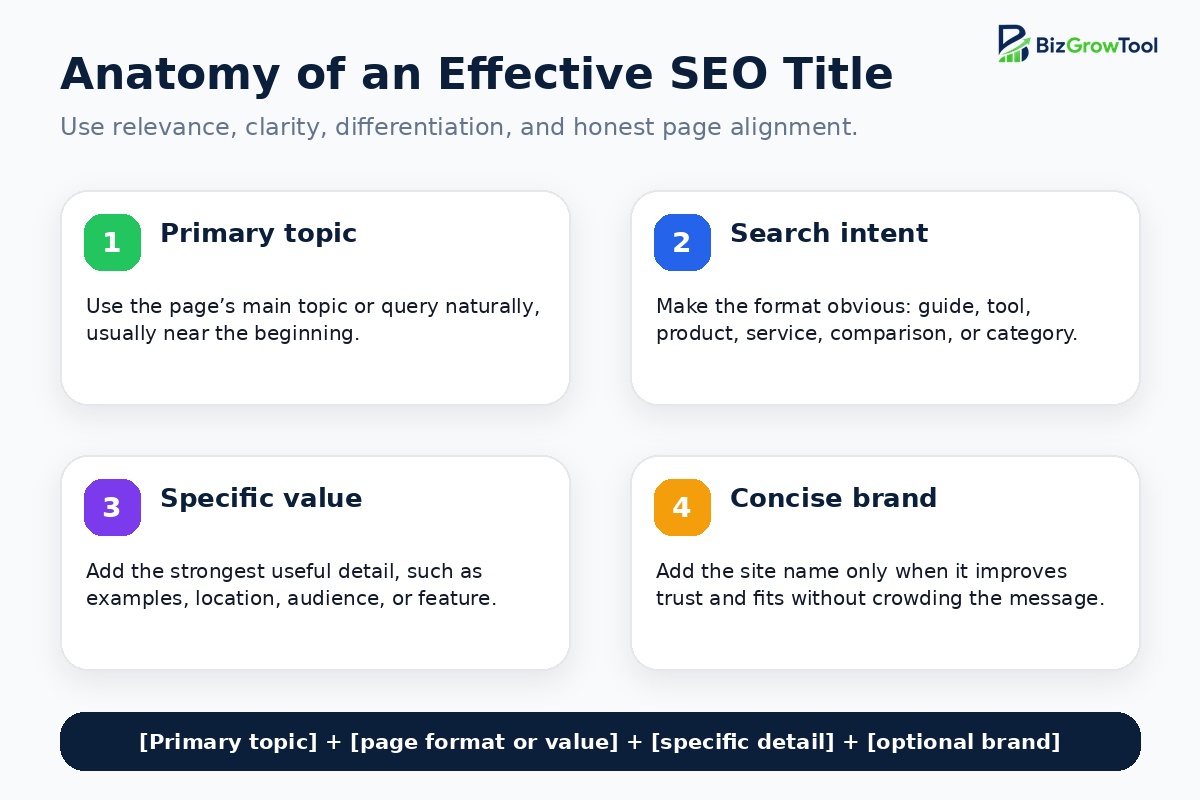
Identify what the user expects: a definition, tutorial, comparison, tool, product, service, category, local provider, or brand page. The title should make the format obvious.
Step 2: Choose one primary topic
Select the main keyword or topic that best matches the page. Do not try to target five similar phrases by placing all of them in the title.
Step 3: Review the current search results
Study the dominant page types, repeated wording, freshness signals, and missing angles. Use the SERP to understand intent, not to copy a competitor’s title.
Step 4: Write a plain-language title first
Describe the page in the clearest possible phrase. A good first draft should make sense even when read outside the website.
Step 5: Add a meaningful differentiator
Include the strongest page-specific value: examples, checklist, calculator, free tool, location, product type, audience, comparison, template, current data, or expert process.
Step 6: Put important wording early
Front-load the topic and value when it reads naturally. This improves scanability and protects the main message if the title is shortened.
Step 7: Add the brand selectively
Add the brand at the end when it improves trust or differentiation. Skip it when the title becomes crowded, especially if the site name already appears separately in the search result.
Step 8: Compare the title with the visible page
Confirm that the H1, introduction, content, product details, service area, date, and CTA support every promise in the title.
Step 9: Remove common rewrite triggers
Delete keyword repetition, outdated dates, vague wording, empty template fragments, excessive boilerplate, and claims that do not reflect the page.
Step 10: Preview, publish, and monitor
Use a SERP preview for editing, verify the live <title> in the page source, request recrawling when appropriate, and review Google Search Console performance after the page has enough impressions.
Create SEO title drafts faster
Use the free BizGrowTool Meta Title Generator to create title ideas for articles, service pages, products, local pages, tools, categories, and landing pages. Review each draft for intent, accuracy, uniqueness, and page alignment before publishing.
SEO Title Formulas
Definition or beginner guide
How-to article
Service page
Product page
Category page
Comparison page
Free tool
List article
SEO Title Examples by Page Type
Homepage
Summarizes the broad value proposition and uses the brand where it matters most.
How-to article
Uses the primary task, context, and a useful content differentiator.
Local service page
Combines service, location, and concise branding without keyword repetition.
Product page
Adds product identity and purchase-relevant specifications.
Category page
Describes the category, price attribute, and intended audience.
Comparison article
Names the comparison and states the exact decision question.
Free generator
Communicates the tool, cost, output, and search context.
Branding guide
Adds concrete value beyond the broad topic.
Weak vs Improved SEO Titles
| Issue | Weak title | Improved title |
|---|---|---|
| Vague | Home | Free Business Tools for Marketing, SEO & Growth |
| Keyword stuffing | SEO Title, SEO Titles, Title Tag SEO, Best SEO Title | Title Tags for SEO: Best Practices & Examples |
| Duplicate boilerplate | Buy Products Online | Store Name | Men’s Leather Watch Straps | Store Name |
| Outdated | Best Invoice Tools for 2024 | Best Invoice Tools for 2026 |
| Mismatch | Free SEO Audit Tool | SEO Audit Checklist for Small Business Websites |
| Too much branding | BizGrowTool Free Tools Online Business Tools Meta Title Generator | Free Meta Title Generator | BizGrowTool |
Why Does Google Change Title Tags in Search Results?
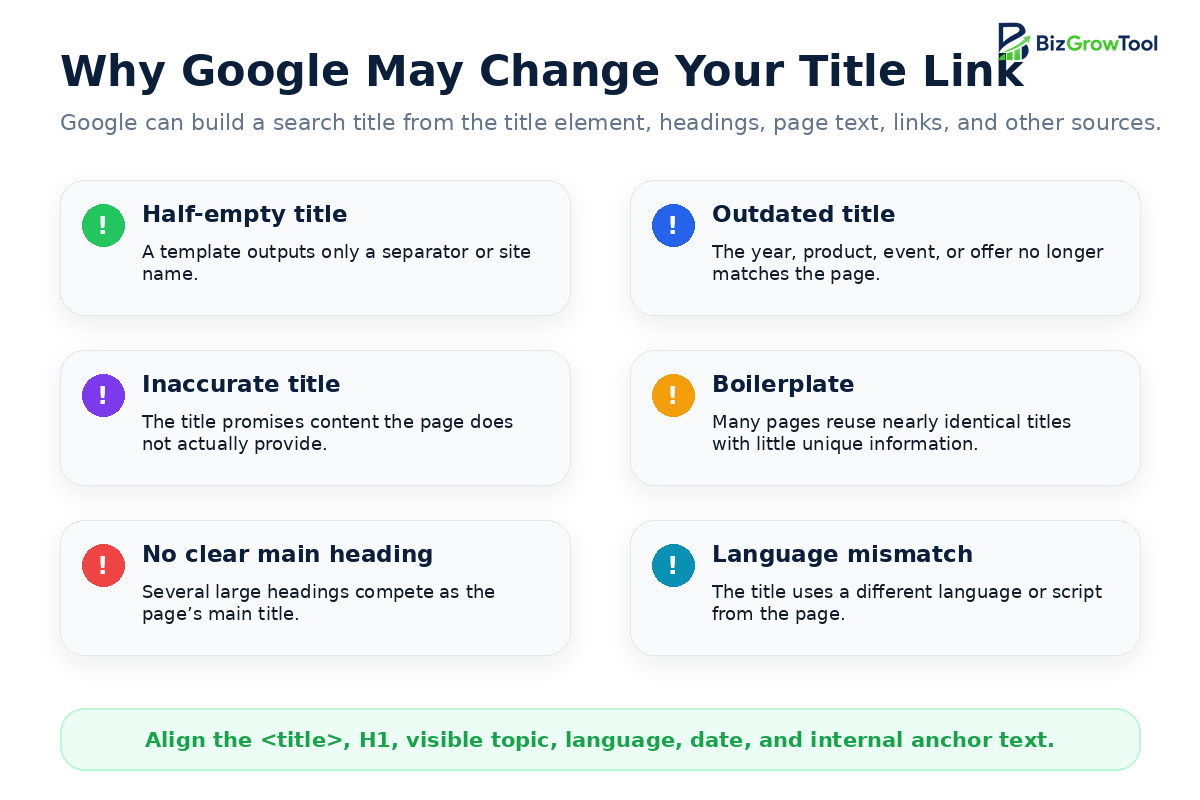
Google’s title-link generation is automated and query-aware. It may use a different title when the supplied title is incomplete, outdated, inaccurate, repetitive, unclear, or less useful than another source on or around the page.
Common title-link rewrite triggers
- Half-empty titles: a broken template outputs only a separator or site name.
- Outdated titles: the year or recurring-event detail no longer matches the page.
- Inaccurate titles: the title describes a broader, narrower, or different topic than the page.
- Micro-boilerplate: many similar pages share the same title and omit the information that distinguishes them.
- No clear main title: several large headings compete as the page’s primary visual heading.
- Language or script mismatch: the title uses a different language or writing system from the main content.
- Duplicated site name: Google may remove repetitive branding when the site name already appears separately.
- Query-specific relevance: another passage or heading may represent a particular search better.
How to reduce unnecessary rewrites
- Use one accurate, complete title element.
- Keep the title and main visible H1 closely aligned.
- Make the first H1 visually distinctive.
- Use unique titles for products, services, categories, and articles.
- Update dates and recurring information promptly.
- Use the same language and writing system as the page.
- Make internal anchor text descriptive and consistent.
- Allow Google to crawl the page so it can evaluate the content.
How to Add or Edit a Title Tag in WordPress
WordPress themes normally generate a title element automatically. SEO plugins such as Rank Math let you define a custom SEO title without changing the visible H1.
Using Rank Math
- Edit the WordPress post or page.
- Open the Rank Math SEO panel.
- Select Edit Snippet.
- Enter the SEO title in the title field.
- Check the preview, but treat the length indicator as guidance rather than a guarantee.
- Update or publish the page.
- Clear WordPress, hosting, and CDN caches where applicable.
- Open the live page source and search for
<title>.
There should normally be one complete title element in the document head. If the source contains two titles, inspect the theme, Rank Math settings, custom header code, and other SEO plugins for duplication.
How to Audit and Improve Existing SEO Titles
1. Crawl the website
Export all indexable URLs with their title text, character count, pixel width, H1, status code, canonical URL, and indexability.
2. Find technical title problems
Missing or empty
Important pages have no usable title or a broken template fragment.
Duplicate
Several indexable pages share the same title despite serving different intents.
Too vague
Titles such as “Home,” “Services,” or “Products” do not distinguish the page.
Too verbose
Long titles hide the important message behind boilerplate and repeated modifiers.
Title–H1 mismatch
The search title and visible heading describe different topics or promises.
Outdated content
The title contains a date, price, event, or offer that is no longer current.
3. Prioritize by opportunity
Start with URLs that already receive impressions, rank near the first page, support valuable conversions, have duplicate titles, or display an obviously poor title link.
4. Use Search Console for query evidence
Review the page’s leading queries, countries, devices, positions, impressions, and click-through rates. Use this data to understand whether the title reflects the real search intent. CTR is a useful diagnostic metric, but title changes should be evaluated alongside ranking, seasonality, SERP features, and page improvements.
5. Rewrite one variable at a time
Keep a record of the old title, new title, change date, target intent, and reason. Avoid repeatedly changing a title before Google has recrawled the page and enough new data is available.
6. Inspect the live search result
Compare your title element, H1, Google title link, and main queries. A different title link is not automatically a failure; judge whether Google’s version is more accurate or useful for the query.
SEO Title Quality Scorecard
Score each proposed title from 1 to 5 across these eight criteria:
Final SEO Title Checklist
- Does the title accurately describe the specific page?
- Is it unique among important indexable URLs?
- Does it match the dominant search intent?
- Is the main topic included naturally, usually near the beginning?
- Does it communicate the page type or useful differentiator?
- Have repeated keywords and boilerplate been removed?
- Is the brand concise and optional rather than forced?
- Does the visible H1 support the same promise?
- Are dates, locations, products, and claims current?
- Is the strongest message protected if the title is shortened?
- Does the source contain one complete
<title>element? - Have you accepted that Google may generate a different title link?