
What Is a Meta Description?
A meta description is an HTML element that provides a short summary of a web page. It is placed in the page’s <head> and is not normally displayed inside the visible article or page content.
Search engines may use this text as the descriptive snippet below a title link. Google explains that its snippets are primarily generated from visible page content, but the meta description may be used when it gives a more accurate summary for the user’s search.
Learn how to write a clear, unique meta description with Google-backed guidance, formulas, examples, common mistakes, and a practical checklist.
Important distinction: the meta description you enter is a suggestion for the search snippet—not a guarantee that the exact same wording will appear for every search.
Is a Meta Description a Google Ranking Factor?
Google has stated that it does not use the description meta tag as a direct ranking signal. That does not make the field unimportant. A useful description can help searchers decide whether the page matches their need, and it can improve the quality of the visitors who choose to click.
Avoid writing descriptions only to insert keywords. Instead, treat each description as a concise search-result summary that accurately represents the visible page.
How Long Should a Meta Description Be?
There is no fixed Google character limit for meta descriptions. Google says snippets are truncated as needed, usually according to the available device width and the specific search context.
As a practical writing target, many site owners draft approximately 140–160 characters for standard pages because that range is often concise enough for search results. However, this is a workflow guideline rather than a ranking rule or guaranteed display limit.
- Do not add filler just to reach a target length.
- Put the most useful information early in case the snippet is shortened.
- Use a longer description when necessary to summarize important product, article, event, or service details accurately.
- Judge quality first and character count second.
What Should a Meta Description Include?
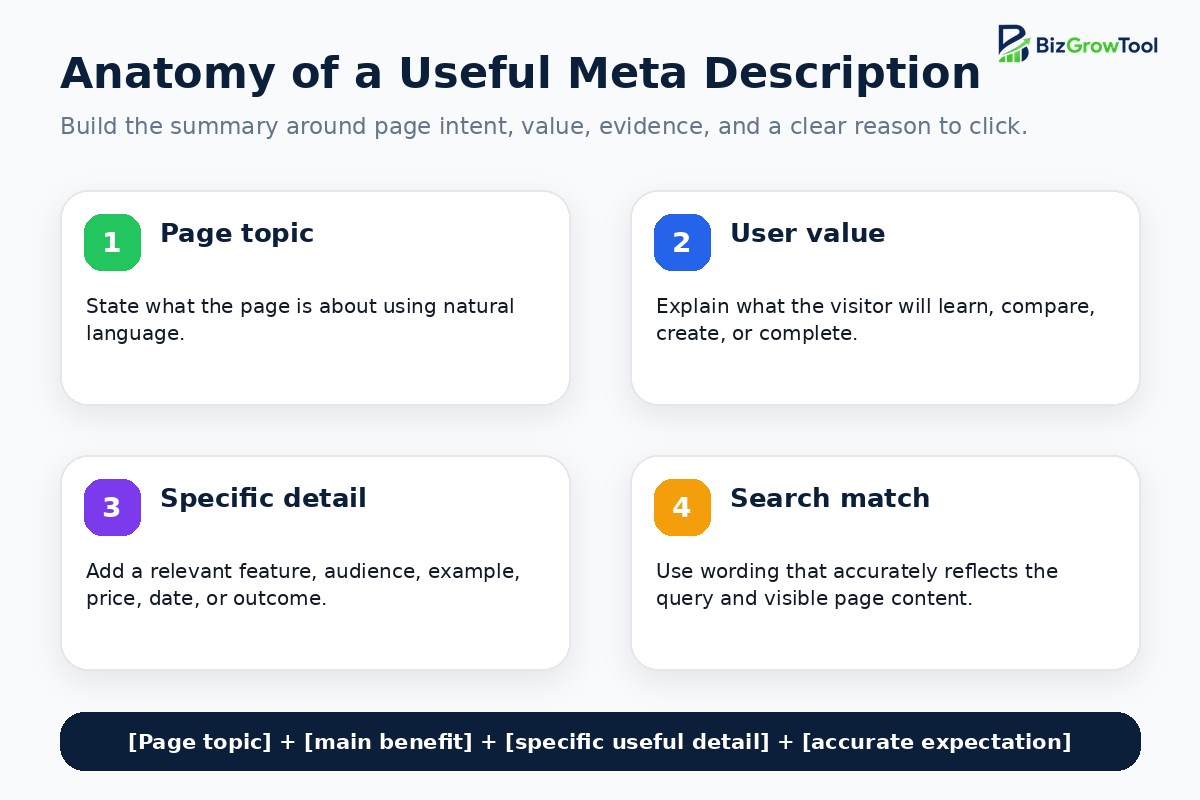
1. The specific page topic
Explain what this exact URL is about. A homepage, service page, category page, product page, and article should not reuse the same general company description.
2. The main user benefit
State what the visitor can learn, compare, create, buy, download, calculate, book, or solve after opening the page.
3. One or two useful details
Add page-specific information that helps the searcher make a decision. Depending on the page, this might be an audience, feature, product type, service area, date, author, price, delivery detail, tool capability, or content format.
4. Natural query language
Use the words customers are likely to recognize, but write a sentence rather than a keyword string. The wording should match the page title, main heading, visible copy, and search intent.
5. An honest expectation
Do not promise free downloads, prices, templates, results, availability, or information that the page does not provide. Search snippets work best when the visitor receives exactly what the description suggested.
How to Write a Meta Description Step by Step
Step 1: Identify the page type and primary intent
Decide whether the page is informational, transactional, commercial, local, navigational, or a mixture. A how-to guide should promise useful instruction, while a product page should summarize the item and the purchase-relevant details.
Step 2: Write a one-sentence page summary
Ignore SEO wording temporarily. Explain the page in plain language to someone who has not seen it.
Step 3: Add the strongest useful detail
Choose the detail that most improves relevance. This could be “with examples,” “for small businesses,” “free tool,” “same-day appointments,” “available in three sizes,” or “includes a checklist.”
Step 4: Use the main topic naturally
Include the primary topic when it fits the sentence, especially when it helps users recognize the page quickly. Do not repeat the same phrase several times.
Step 5: Remove generic and duplicated wording
Delete phrases such as “Welcome to our website,” “best quality service,” or “click here to learn more” unless they add page-specific meaning. Compare the description with related URLs and make sure it is not a copy.
Step 6: Check accuracy against the visible page
Confirm that the title, H1, description, introduction, examples, product data, service details, and CTA all tell the same story.
Step 7: Put the strongest information first
Because snippets may be shortened or rewritten, lead with the page’s most important topic and value rather than starting with filler.
Step 8: Preview and test
Preview how the copy may appear on desktop and mobile, then monitor Search Console performance after indexing. Do not assume every click-through change was caused by the description alone; titles, rankings, rich results, intent, competition, seasonality, and SERP design also affect clicks.
Create page-specific description drafts
Use the free BizGrowTool Meta Description Generator to create draft descriptions for homepages, service pages, product pages, local pages, articles, tools, and landing pages. Review every output against the real page before publishing.
Meta Description Formulas
How-to article formula
Service page formula
Product page formula
Category page formula
Local landing page formula
Free tool formula
Meta Description Examples by Page Type
These examples are templates. Replace every product, service, location, feature, and claim with information that appears on your actual page.
Small-business tools website
Local plumbing
Leather watch strap
Business-name guide
Dental clinic
Invoice generator
Strong and Weak Meta Description Examples
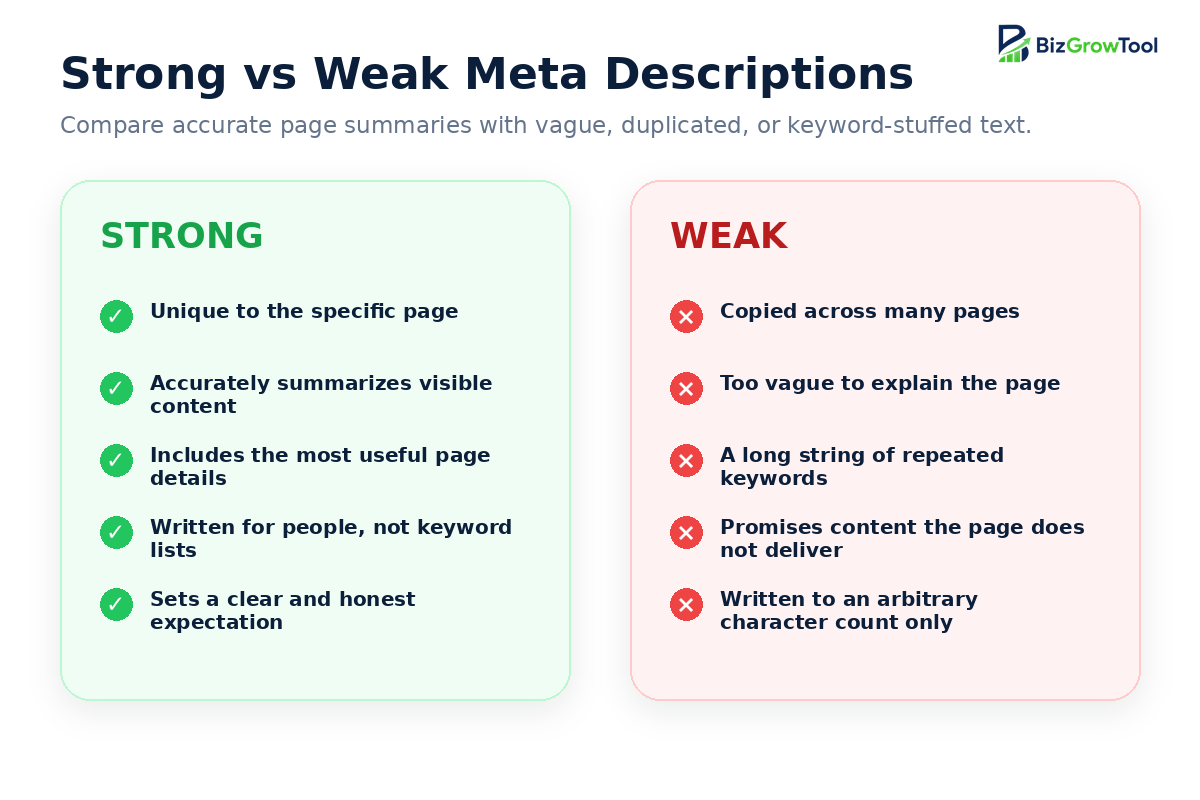
| Problem | Weak description | Improved direction |
|---|---|---|
| Too vague | Welcome to our website. We provide great solutions for everyone. | Name the service, audience, location, and next step. |
| Keyword list | plumber Dallas, Dallas plumber, emergency plumber, plumbing company | Write one natural summary using the main service and location once. |
| Duplicate | The same company description appears on every service page. | Summarize the unique content and purpose of each URL. |
| Mismatch | Promises a free template that the page does not contain. | Describe only the content or feature that is actually available. |
| Filler | Click here today to visit our amazing page and learn more now. | Replace generic CTA wording with concrete page value. |
Why Does Google Rewrite Meta Descriptions?
Google may display a different snippet because snippets are query-dependent. Text taken from the visible page may answer a particular search more directly than the supplied meta description.
Common reasons the supplied description may not be used include:
- The search query focuses on a different part of the page.
- The description is vague, generic, duplicated, inaccurate, or low quality.
- The visible page contains a passage that better matches the user’s wording.
- The description is a keyword list instead of a readable summary.
- The description is missing or fails to describe the specific URL.
- The result needs a different amount of text for the device or search format.
A rewritten snippet does not automatically mean the page has an SEO error. Review the actual query, displayed snippet, and page content before changing anything.
How to Add a Meta Description in WordPress
WordPress core does not provide a standard meta-description field for every theme. SEO plugins usually add one to the post or page editor.
Using Rank Math
- Edit the WordPress post or page.
- Open the Rank Math SEO panel.
- Select Edit Snippet.
- Enter the SEO title and meta description.
- Update or publish the page.
- Clear site and CDN caches when necessary.
- Inspect the live page source to confirm that one description meta tag appears in the
<head>.
Avoid adding the same tag manually through the theme, a header plugin, and an SEO plugin at the same time. Duplicate meta-description tags create conflicting signals and should be removed.
How to Audit Meta Descriptions Across a Website
Find missing descriptions
Identify indexable pages that have no description meta tag, especially homepages, service pages, products, categories, tools, and high-traffic articles.
Find duplicate descriptions
Group identical and near-identical descriptions, then rewrite important URLs around their unique purpose.
Check page alignment
Compare each description with the current title, H1, visible copy, offer, product data, location, and CTA.
Prioritize by opportunity
Start with pages that already receive impressions, rank near page one, have weak click-through rates, or support important business goals.
Review query context
Use Search Console queries to understand what searchers expect and whether the page actually satisfies those needs.
Monitor after updates
Allow time for recrawling and compare performance over a meaningful period instead of judging a description after one or two days.
Final Meta Description Checklist
- Does it summarize the specific URL rather than the whole website?
- Is it accurate when compared with visible page content?
- Is it unique among important indexable pages?
- Does it explain a useful benefit, feature, or detail?
- Is the main topic included naturally?
- Have keyword lists, filler, and exaggerated claims been removed?
- Is the strongest information placed near the beginning?
- Would a qualified searcher understand what happens after clicking?
- Is there only one description meta tag in the page source?
- Have you accepted that Google may show a different query-specific snippet?